
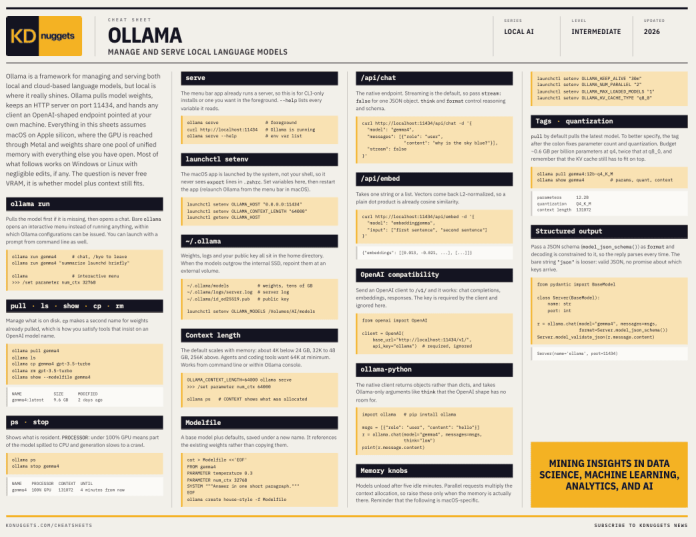
Ollama pulls model weights, keeps an HTTP server on port 11434, and hands any client an OpenAI-shaped endpoint pointed at your own machine. This guide covers how to manage, configure, and optimize it.
Running a language model on your own hardware has become straightforward enough that the interesting problems have moved elsewhere. Ollama pulls model weights, keeps an HTTP server on port 11434, and hands any client an OpenAI-shaped endpoint pointed at your own machine. Getting that far only takes one command.
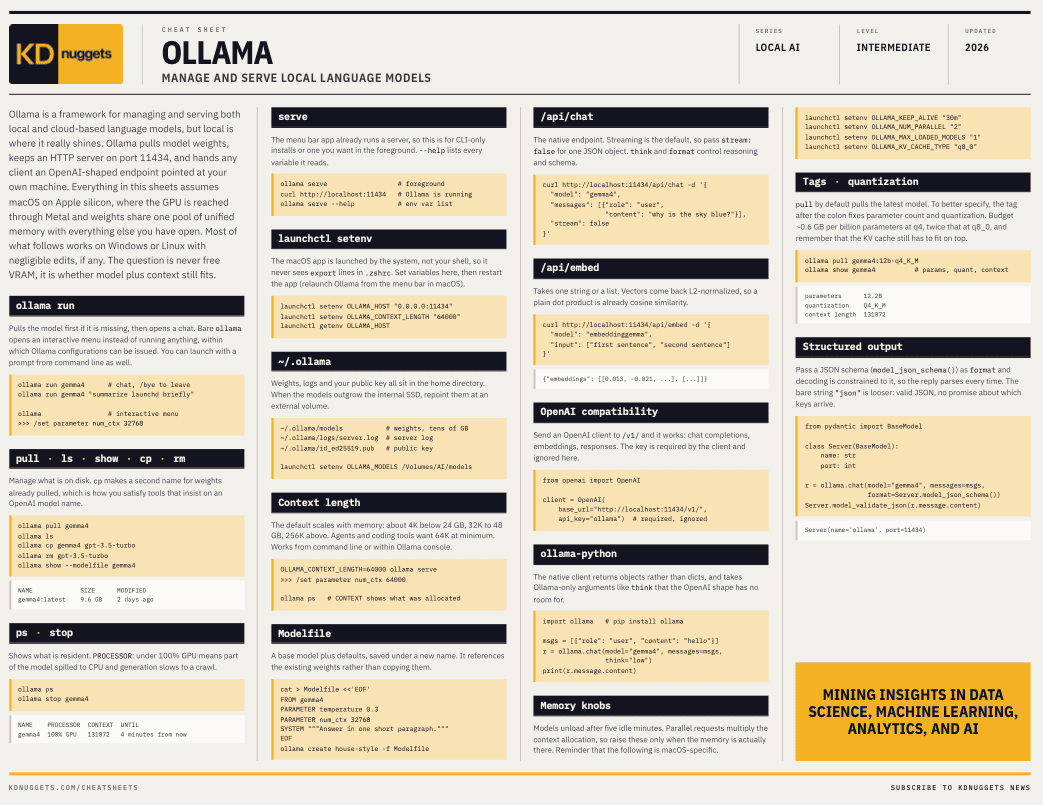
The harder question is whether the model plus its context still fits in the memory you have. ollama ps answers it. Alongside which models are currently resident, it shows a PROCESSOR column—anything under 100% GPU means part of the model has spilled to CPU and generation has slowed to a crawl. It also reports the context that has actually been allocated, which may not be the number you expected or requested. Knowing where to look makes local model sizing decisions resolve quickly when you serve with Ollama.
You can download our latest cheat sheet to keep this info handy as you build and experiment with Ollama.
You’ll also want to understand how Ollama interacts with your local OS. The desktop app, for example, is launched by the system rather than your shell, so it never sees export lines in a .zshrc. Configuration that looks correct in a terminal simply has no effect. On macOS, variables have to be set through launchd via launchctl setenv. This is the most common reason a context length or a model directory refuses to change even when everything looks correct.
Structured output has its own nuances. Passing a JSON schema as format constrains decoding to that shape, so the reply parses every time rather than most of the time. The bare string "json" is the looser option: valid JSON, but no guarantee about which keys arrive.
The rest of the cheat sheet rounds out the fundamentals: disk-management commands, the /api/chat and /api/embed endpoints, and the /v1/ compatibility layer that lets an existing OpenAI client switch to localhost unchanged. It also covers Modelfiles for saving a base model with your own defaults, plus the environment variables governing how long models stay loaded and how many run at once.
Don’t wait. Download the cheat sheet now and get those optimized local models up and running.
- High-Performance Data Processing with Polars: A KDnuggets Cheat Sheet
- Estimators in Scikit-LLM: A KDnuggets Cheat Sheet
- Feature Engineering in Scikit-Learn: A KDnuggets Cheat Sheet
- Tweaking Local Language Model Settings with Ollama
- Kaggle CLI Cheat Sheet
- Big O Complexity Cheat Sheet for Coding Interviews