

As a paid media marketer in a regulated field such as healthcare, finance, or legal services, AI features in ad platforms can raise legitimate concerns. Automated bid strategies operate as a “black box,” which can clash with organizational rules around targeting, and AI-generated creative often needs compliance sign-off before it can run. Knowing your company’s policies and your industry’s guidelines before you touch these features is the first practical step.
Below, we look at both broad AI considerations and specific platform settings to keep on your radar.
Understand Your Organization’s AI Policy Before You Enable Anything
Companies in restricted industries tend to be cautious about AI in advertising, but the level of caution varies widely from one organization to the next. Find out where your organization draws the line and which concerns carry the most weight internally.
One company may reject auto-generated creative that can’t be previewed in advance, yet still allow AI involvement in images or videos that receive human approval before launch. Others may avoid AI in creative production entirely.
Organizations in strict industries are also likely to be extra cautious about disclosing any AI involvement in ads. If AI played a role at any stage of creative production, most ad platforms offer a checkbox to declare this, in line with requirements in some countries and U.S. states.
Watch what data you feed into AI tools when you analyze results or draft copy ideas. Customer data can trigger privacy violations, and internal rules may prohibit uploading documents that contain proprietary information.
See also: Can You Use AI To Write For YMYL Sites? (Read The Evidence Before You Do)
AI Max: Where It Can Conflict With Approved Messaging
Some advertisers have reported success testing AI Max selectively, but the feature carries risks that hit restricted industries hardest. Text customization can pull in ad copy that doesn’t match approved messaging, and final URL expansion can send traffic to pages on your site you never intended to promote.
If you do test AI Max, consider disabling both of those features and running only the keyword expansion element. The screenshot below shows Google Ads campaign settings; Microsoft Advertising offers similar options.
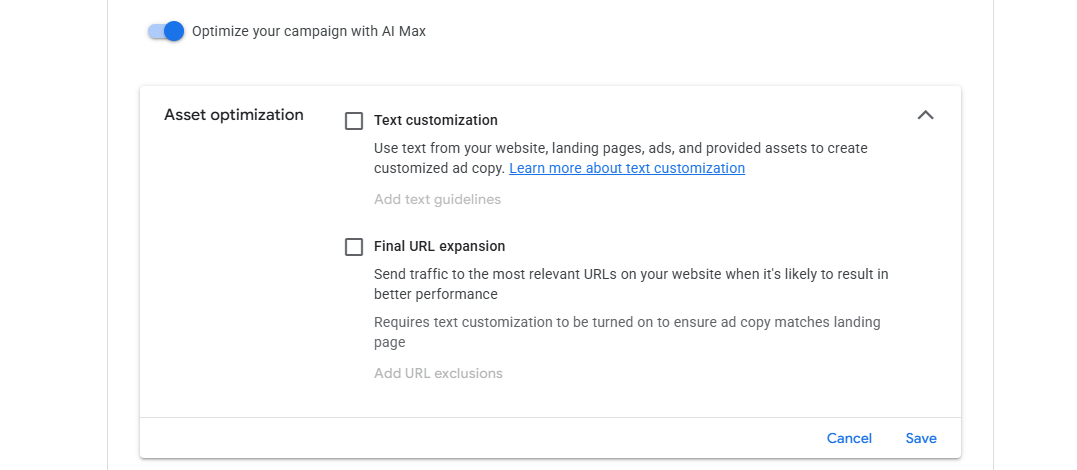
Platforms point to brand guidelines as a way to keep text customization aligned with your requirements, but the feature remains risky in industries where compliance approval depends on exact wording. Even when it draws from your own website or past copy, it could surface a claim like “award-winning products” without the disclaimer that claim legally requires, such as the source of the award.
See also: Ask A PPC: How To Manage Brand Safety In PPC
Performance Max And Demand Gen: Watch the Asset Optimization Toggles
Pay attention to any platform option that can auto-generate creative or modify your own assets without warning. A common problem: an approved image ends up running in the wild with a layout nobody signed off on.
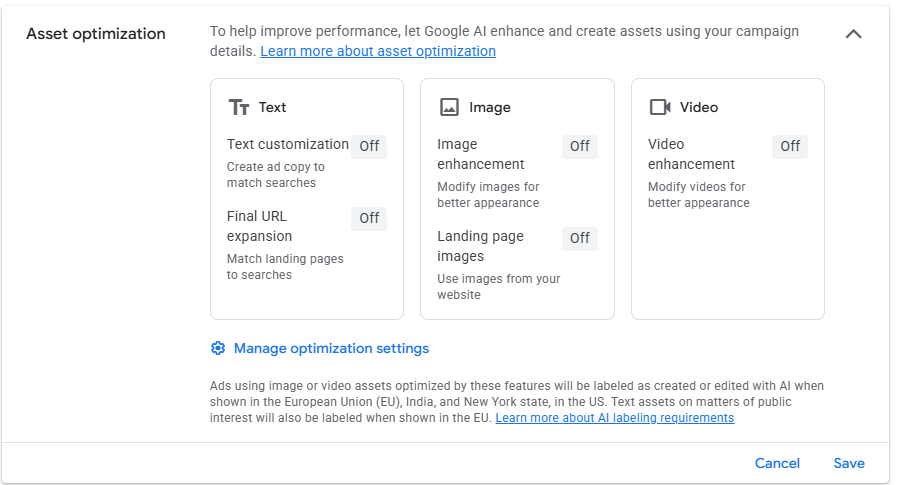
In Google, two settings deserve a close look. Performance Max has campaign-level Asset Optimization controls covering text, image, and video. Leaving them on can let noncompliant copy or creative serve unexpectedly.
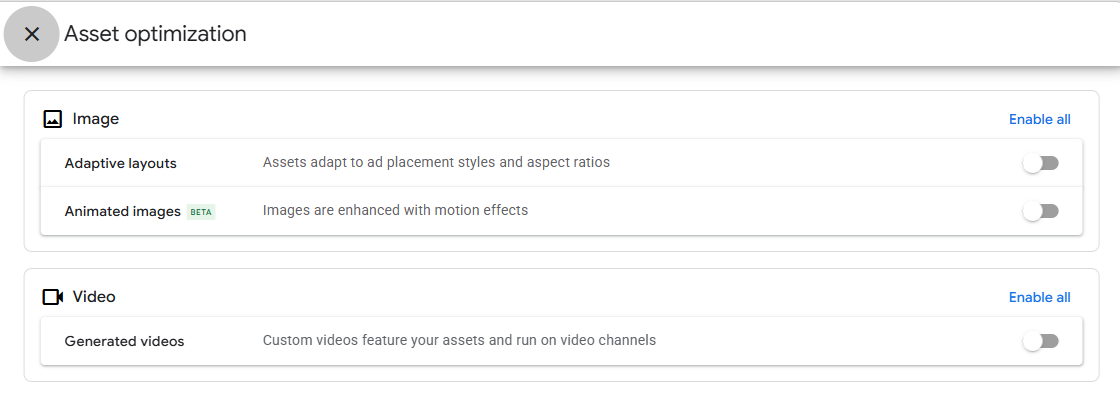
Demand Gen has similar controls at the ad level, including the option to generate a video from your assets. That output may not fit your branding approach and may omit required disclaimers.
Meta Enhancements: Preview Every Placement
In my experience, Meta is the most aggressive about applying visual enhancements that can shift your ad’s appearance far from the original design. Interface placement of these options changes often, so look for sections labeled something like “Creative setup” and “Advantage+ creative enhancements,” then toggle them off.
These options can create brand and compliance problems because colors, fonts, and design choices may change. Unwanted text and links can also be appended to your ads.
Preview your ads across every Meta placement you have enabled. An ad can look fine and remain brand-safe in a feed, while the Reels format layers elements over a required disclaimer.
Targeting And Bidding: Platform Limits Plus Internal Rules
Platforms already restrict targeting for many regulated industries, but your organization may impose further limits. You may, for example, need to avoid age targeting even on platforms that permit it, because of regulations affecting your industry.
List-based targeting raises its own issues, since sensitive industries tend to be extra careful about syncing customer data to ad platforms. In the U.S., HIPAA regulations set strict protocols for how healthcare-related data can be used.
Retargeting is another frequent pain point. Several platforms ban pixel-based retargeting outright for healthcare and certain other industries. Check internal policies too, since you may run afoul of them even when the feature is technically available to your industry.
Automated bidding introduces its own concern: the underlying models may bias toward certain individuals in ways that raise flags for your organization. In financial services, fair lending compliance means scrutinizing any discrimination based on age, gender, or location, including bias that may exist inside an algorithm. Working with your ad platform reps can help you obtain documentation to address those concerns.
Advantage+ targeting in Meta and optimized targeting in Google can push you outside your intended audience without warning. Know where to switch these off so your reach doesn’t expand beyond what you planned, particularly when compliance or risk is at stake.
Conversion Tracking: More Important as Targeting Loosens
As ad platforms lean harder on AI-driven bidding with looser targeting, accurate conversion tracking becomes more critical, not less. Optimizing toward the people most likely to complete a valuable action on your site, such as submitting an application or opening an account, is often the most effective way to reach prospects, especially when audience targeting is tightly limited in your industry.
At the same time, internal processes and restrictions can make tracking pixels and offline data uploads tedious to set up. Budget time to work with the right teams so you can get the tracking you need in place, and be ready to justify its value.
If your organization restricts tracking pixels, whether from distrust of a specific platform or a blanket policy, you may need alternate ways to measure results. One option: include UTM parameters on form fills and associate each lead with the source that drove it.
Audit Your Setup And Document What You Find
Take time to audit your current paid media setup and flag where AI usage could create problems for your organization. Inside ad platforms, document features such as automated assets and enhancements that could alter previously compliance-approved creative. Identify where you can add safeguards around features like AI Max and campaign types like Performance Max.
Start internal conversations about where AI should and should not be used for data analytics and creative development. Above all, be clear on how to balance platform policies for your industry, internal compliance rules, and regulatory requirements.
More Resources:
- Google Ads Now Requires Disclosure Labels On AI-Generated Content
- How To Leverage AI Ad Placements For Stronger PPC Performance
- Why Paid Search Foundations Still Matter In An AI-Focused World
Featured Image: Master1305/Shutterstock