

WordPress users are upset with Rank Math over allegations that it creates administrator-level access without prior consent.

New allegations have surfaced that Rank Math introduced a feature that silently grants the company administrator-level permissions over WordPress sites. The access is triggered when a user installs Rank Math and opens the plugin’s Help & Support area.
Allegedly There Is Zero Consent Or Notification
The developer of The SEO Framework SEO plugin recently tweeted that when a user opens Rank Math’s Help & Support section, the plugin creates a WordPress Application Password tied to the user who is opening that section. If that user has administrator permissions, the WordPress Application Password Rank Math generates inherits those administrator-level permissions.
Sybre Waaijer :
“Two days ago, Rank Math closed about a dozen security issues in 1.0.277. This plugin runs on over 4 million sites.
In that same update, group[.]one (who also owns WP Rocket) now gets administrative privileges to your site.
Last time, I classified something like this as a backdoor. This time, you may decide.
The file: vendor/groupone/wap-client/includes/class-app-password-manager.php.
What it does:
When a site administrator whose site is connected to a (free) rankmath[.]com account opens “Help & Support,” the plugin immediately creates a WordPress Application Password for that user. It sends that password to group[.]one’s servers. Their AI agent can then act on your behalf on your site.”
WordPress Application Password
WordPress Application Passwords are a legitimate part of WordPress core, and plugins are permitted to use them. Official guidelines even tell plugin developers how to generate WordPress Application Passwords. That’s likely why Sybre Waaijer hedged about categorizing what Rank Math is doing as a backdoor.
Rank Math Does Not Ask For Authorization
One of the several reasons Waaijer objects to what Rank Math is doing has to do with how Rank Math generates those permission levels for itself.
He explained:
“The plugin never asks first. There is a “Terms & Conditions” box, but it does not stop the password from being created or sent. The transfer starts before the box even appears.”
User Authorization Is Built Into WordPress’s Application Password Flow
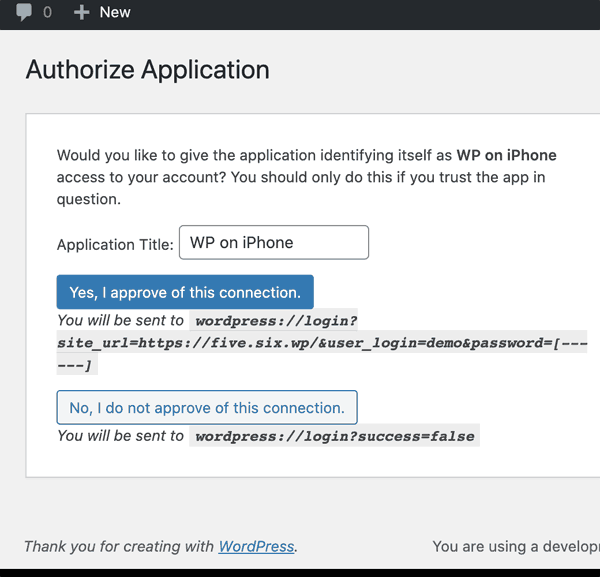
The official WordPress documentation specifies an authorization screen where the plugin identifies itself, the user is shown the connection and is given the opportunity to approve or reject it. The specification says the Application Password is only passed to the plugin once it has been approved by the user.
Screenshot Of Authorization Example
WordPress.org Explicit Consent Rule
WordPress’s plugin guidelines specify an explicit consent rule in regard to external servers. Official guidelines say plugins may not contact external servers without “explicit and authorized consent,” specifying an opt-in checkbox. They also prohibit automated collection of user data without explicit confirmation.
The guidelines specify:
“7. Plugins may not track users without their consent.
In the interest of protecting user privacy, plugins may not contact external servers without explicit and authorized consent. This is commonly done via an ‘opt in’ method, requiring registration with a service or a checkbox within the plugin settings. Documentation on how any user data is collected, and used, should be included in the plugin’s readme, preferably with a clearly stated privacy policy.”
Application Passwords Are Meant To Be Revocable Credentials
WordPress describes Application Passwords as something that a user can review and revoke.
“Application Passwords are a WordPress feature that lets you generate revocable, per-application credentials…”
And also:
“An Application Password is:
Individually revocable, so you can disable a single integration without changing the user’s primary password.”
Waaijer advised how to go about revoking the Application Password that the Rank Math support agent triggers:
“The password shows up on your profile as “WAP – Rank Math Support Agent”. Closing the “Help & Support” tab does not revoke it. This Application Password does not expire. You cannot turn the “Support Agent” off.
What you should do:
If you opened “Help & Support” while connected, revoke the Application Passwords immediately.Go to “WP Admin -> Users -> Profile -> Application Passwords, and revoke anything starting with “WAP –”.”
User Responses
User reaction was overwhelmingly negative.
@tprinty’s
exemplified the anger that users felt toward Rank Math:
“This is horrible. WP needs SEO as part of core.”
Rank Math Accused Of Deleting Complaints
@CAwavehello related that the Rank Math discussion forum had a big thread about this topic and that the discussion was subsequently deleted, presumably by Rank Math.
@CAwavehello
:
“I was wondering what all that fuss was about. There was a huge thread started on their WP forum page a few days ago and now it magically got deleted. Got the notification today they deleted it after all hell broke loose on their users forum. WTF?!”
Users Moving Away From Rank Math
@SwiftyLunatic
that they were moving their websites away from Rank Math:
“Time to move my websites away from @rankmathseo
why do this you shady company. Best seo plugin to switch too, please?”
@SEOMastery2026
:
“wait admin access without asking?”
Rank Math Not On SEJ’s Approved Plugin List
Rank Math did not make the cut for Search Engine Journal’s list of recommended WordPress plugins because one of the requirements is that plugins be trustworthy, which includes not having a history of vulnerabilities.
Rank Math had seven vulnerabilities in 2024, four vulnerabilities in 2025, and so far in 2026 there have been three vulnerabilities discovered in Rank Math, including a recent Unauthenticated Stored Cross-Site Scripting vulnerability. Always do a thorough check of all plugins that are used on your site, including a security check.
Featured Image by Shutterstock/ViDI Studio
Read Full Bio
Roger Montti
Owner – Martinibuster.com at Martinibuster.com
I have 25 years hands-on experience in SEO, evolving along with the search engines by keeping up with the latest …